Data science guide
YouTube for Data Scientists: Organize ML, Python & TensorFlow Tutorials
A data scientist watches hundreds of YouTube tutorials. The problem is not finding them - it is finding them again. That Transformer paper walkthrough where the attention mechanism finally clicked, the PyTorch training loop that handled gradient accumulation correctly, the feature engineering lecture that transformed your approach to tabular data. All buried in browser history. Here is how data scientists use YouTube Bookmark Pro to build a structured research and learning library.
YouTube for Data Scientists: Key Numbers
Most-Watched Data Science Topics on YouTube
Data Science Learning via YouTube: Time per Milestone
What data scientists actually watch on YouTube
Data science sits at the intersection of statistics, programming, and domain expertise. YouTube is where the best explanations of all three converge. Here is what fills a typical data scientist's watch history.
Machine learning fundamentals and algorithms
Gradient boosting, random forests, SVMs, logistic regression, regularization techniques, cross-validation strategies, hyperparameter tuning. These tutorials range from intuitive visual explanations to rigorous mathematical derivations. The challenge is that you often need both: the intuitive explanation to understand the concept and the mathematical one to implement it correctly. Losing track of either means rewatching hours of content to find the specific derivation step or visual analogy you need.
Deep learning and neural network architectures
CNNs, RNNs, LSTMs, Transformers, attention mechanisms, batch normalization, dropout strategies, learning rate scheduling, transfer learning workflows. Deep learning tutorials are dense with architectural details that you need to reference repeatedly. The difference between a working model and a broken one is often a single hyperparameter or layer configuration that an instructor explains at one specific moment in a two-hour lecture.
NLP and computer vision
Tokenization strategies, embedding layers, sequence-to-sequence models, object detection architectures, image segmentation, data augmentation pipelines, pre-trained model fine-tuning. These specialized domains have their own vocabulary, their own common pitfalls, and their own tutorial ecosystems. A data scientist working on NLP might watch 20 tutorials in a week during a project ramp-up, and the critical implementation detail from tutorial number 7 is impossible to find two weeks later without a system.
Research paper walkthroughs
Channels like Yannic Kilcher, Two Minute Papers, and AI Coffee Break publish detailed walkthroughs of new research papers. These are essential for staying current but notoriously hard to reference later. You remember that someone explained the key innovation in a paper, but you cannot remember which channel, which video, or at what timestamp. The paper itself might be 30 pages of dense mathematics, and the YouTube walkthrough distilled it into the 3 minutes of explanation you actually need.
Python frameworks and tooling
PyTorch, TensorFlow, scikit-learn, Hugging Face Transformers, MLflow, Weights and Biases, pandas for feature engineering, NumPy optimization. Framework tutorials are the most frequently revisited content because the APIs change, the best practices evolve, and you rarely memorize the exact syntax for operations you perform quarterly rather than daily. Every data scientist has searched for the same PyTorch DataLoader tutorial multiple times because the configuration details are too specific to memorize but too important to get wrong.
Why standard tools fail data scientists
Research papers and tutorials are different kinds of knowledge
Data scientists consume two fundamentally different types of content on YouTube: conceptual explanations that build understanding, and implementation tutorials that provide specific code patterns. Browser history and Watch Later treat both identically, making it impossible to distinguish between "I need the theoretical explanation of attention mechanisms" and "I need the PyTorch code for multi-head attention." These require different retrieval strategies, and flat lists support neither.
Hyperparameters and architectures need precise notes
The difference between a model that trains and one that diverges can be a learning rate of 3e-4 versus 3e-3, or 6 encoder layers versus 12. These details appear on screen for seconds during a tutorial and are gone. Browser bookmarks cannot capture them. Watch Later cannot annotate them. The only system that works is one that lets you write "Architecture: 6 encoder layers, 8 attention heads, d_model=512, dropout 0.1" next to the saved video and search for it later by any of those parameters.
Long lectures need timestamp precision
A Stanford CS229 lecture is 75 minutes long. The explanation of the kernel trick that you need lives in a 4-minute segment starting at minute 42. Without timestamps, revisiting this lecture means either rewatching the entire thing or scrubbing through it trying to identify the right segment from thumbnail previews. With a timestamp and a note, you jump directly to the explanation in seconds. This difference compounds when you have 50 saved lectures across multiple courses.
Context switching kills learning momentum
Data scientists often learn in sprints: three days deep in NLP before a project, a week on MLOps during a deployment phase, a month of reinforcement learning for a research proposal. Each sprint generates dozens of saved tutorials that need to be organized separately. Without categories, the NLP tutorials from January get mixed with the MLOps content from March, and the retrieval cost makes the entire library useless. Categories that match your learning sprints preserve the context that makes each saved video useful.
The data scientist's organized workflow
Categories built for ML research and implementation.
Step 1 - Save with timestamps and architecture notes
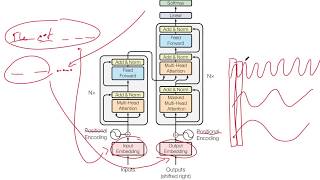
You are watching a Transformer paper walkthrough. At 42:15, the instructor explains the attention mechanism with a diagram that finally makes the multi-head concept clear. Click save, set the timestamp, and write: "Attention mechanism explanation - Q, K, V matrices, scaled dot-product, why we divide by sqrt(d_k). Multi-head splits at 44:30." When you need to explain attention to a colleague or revisit the concept before implementing it, you have the exact timestamp and a description of what you will find there.
Step 2 - Categorize by domain and purpose
Create shelves that reflect how you work: Machine Learning, Deep Learning, NLP, Computer Vision, Research Papers. Within each, consider sub-categories: "Deep Learning - Architectures," "Deep Learning - Training Tricks," "NLP - Transformers," "NLP - Embeddings." The goal is to make retrieval match how you think about problems. When you need a refresher on batch normalization, you know to look in Deep Learning - Training Tricks, not scroll through a chronological list of everything you have ever saved.
Step 3 - Record model configurations in notes
This is where the Library becomes a research notebook. When a tutorial walks through a working model configuration, capture the specifics: "Architecture: 6 encoder layers, 8 attention heads, d_model=512, dropout 0.1." When a paper walkthrough reveals the training setup, note it: "Batch size 64, warmup steps 4000, Adam with beta1=0.9 beta2=0.98." These notes transform your video library into a searchable configuration reference. Search "dropout" and find every video where you recorded a dropout strategy alongside the explanation of why it works.
Step 4 - Build a living research reference
Over months, your library becomes a curated collection of the best explanations, the working configurations, and the research insights that matter to your work. It is not a dump of every video you have watched. It is a selective, annotated, categorized knowledge base. When you start a new project, you check your library first. When you onboard a new team member, you share timestamped links to the tutorials that explain your team's approach. When you write a paper, your related work section starts with the walkthroughs you have already catalogued.
Timestamp and notes in practice
Real examples from a data scientist's workflow.
Research paper walkthrough
Save at 42:15 - the attention mechanism explanation in the Transformer paper walkthrough. Your note reads: "Scaled dot-product attention: Attention(Q,K,V) = softmax(QK^T / sqrt(d_k))V. Multi-head allows model to attend to different representation subspaces. Instructor compares to single-head at 44:30." This captures both the mathematical formula and the intuitive explanation, linked to the exact moment in the video.
Model architecture notes
Note: "Architecture: 6 encoder layers, 8 attention heads, d_model=512, dropout 0.1." This is a configuration you will reference when implementing your own Transformer variant. Your note continues: "Positional encoding uses sine/cosine. Feed-forward dim is 2048. Label smoothing 0.1 for regularization. Training details at 58:20." Two timestamps, one video, complete architectural reference searchable by any parameter.
Framework implementation example
Save at 28:40 - PyTorch gradient accumulation for large batch training on limited GPU memory. Note: "Effective batch = micro_batch * accumulation_steps. Zero grad every N steps not every step. loss.backward() accumulates by default. optimizer.step() + optimizer.zero_grad() only after N forward passes. Works with mixed precision at 33:15." This turns a video bookmark into a runnable reference card.
Your machine learning tutorial library
Library view with data science categories.



Start today
Turn YouTube into your ML research library
Stop losing model architectures, hyperparameters, and paper insights to browser history. Save tutorials with timestamps and technical notes, categorize by domain, and build a searchable knowledge base. The Library is free forever.
Related guides
Frequently asked questions
Can I save model hyperparameters and architecture details in YouTube Bookmark Pro?
Yes. Every saved video has a notes field where you can record architecture details, hyperparameters, training configurations, and any technical specifics from the tutorial. These notes are fully searchable, so you can search for "dropout 0.1" or "attention heads" and find the exact video with that configuration.
How do I organize ML tutorials separately from research paper walkthroughs?
Create separate shelves for Research Papers, Machine Learning, Deep Learning, NLP, and Computer Vision. Each shelf can have sub-categories for specific topics. The structure matches how you think about your work, making retrieval intuitive instead of linear scrolling.
Is YouTube Bookmark Pro free for data scientists?
The Library tier is free forever and includes video bookmarks, timestamps, notes, categories, search, and privacy mode. This covers most research and learning organization needs. Pro adds cloud sync at €6 per month (from €4.90/mo annually) for accessing your library across devices.
Can I timestamp multiple moments in a single long lecture?
You can save the same video multiple times with different timestamps and notes, or include multiple timestamps in a single note. Many data scientists save a lecture once and list several timestamps in the notes: "Kernel trick at 42:15, SVM margin at 28:00, regularization at 55:30." All searchable from one entry.
Does YouTube Bookmark Pro work with channels like 3Blue1Brown and Yannic Kilcher?
YouTube Bookmark Pro works with every YouTube video on every channel. It is a Chrome extension that adds save, timestamp, and note functionality to all of YouTube. Whether you watch 3Blue1Brown, Yannic Kilcher, StatQuest, or Stanford online lectures, the workflow is identical.